
Modding:Installing SMAPI on Windows: Difference between revisions
imported>Neitrin0 |
imported>Neitrin0 No edit summary |
||
| Line 7: | Line 7: | ||
__TOC__ | __TOC__ | ||
== | ==Установка== | ||
; | ; Часть 1: установка SMAPI | ||
:# | :# Запустите игру без SMAPI хотя бы один раз, для того чтобы выполнить первоначальную настройку. | ||
:# | :# Скачайте [https://smapi.io/ latest version of SMAPI]. | ||
:# Extract the <tt>.zip</tt> file somewhere (but not in your game folder!). | :# Extract the <tt>.zip</tt> file somewhere (but not in your game folder!). | ||
:# Double-click <tt>install on Windows.bat</tt>¹, and follow the on-screen instructions.<br />''The installer will detect your game and add SMAPI for you.'' | :# Double-click <tt>install on Windows.bat</tt>¹, and follow the on-screen instructions.<br />''The installer will detect your game and add SMAPI for you.'' | ||
| Line 44: | Line 44: | ||
[[zh:使用模组:在Windows上安装SMAPI]] | [[zh:使用模组:在Windows上安装SMAPI]] | ||
[[Ru:使用模组:在Windows上安装SMAPI]] | |||
Revision as of 07:31, 22 December 2018
This page explains how to install SMAPI (the tool which lets you use mods) on Windows. See also:
Установка
- Часть 1: установка SMAPI
- Запустите игру без SMAPI хотя бы один раз, для того чтобы выполнить первоначальную настройку.
- Скачайте latest version of SMAPI.
- Extract the .zip file somewhere (but not in your game folder!).
- Double-click install on Windows.bat¹, and follow the on-screen instructions.
The installer will detect your game and add SMAPI for you. - If you use Steam, continue to the next section. Otherwise just run StardewModdingAPI.exe in your game folder to play with mods.
- Part 2: configure Steam
- You can use SMAPI through the Steam client to enable the overlay and achievements. This requires a few more steps.
- Keep SMAPI's installer window open.
(If you already closed it, just run it again. No need to uninstall first.) - Copy the text in the installer window that looks like this (see how to copy text):

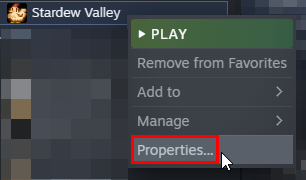
(Make sure you copy the entire line, including both quotes and the%command%part.) - In the Steam client, right-click on Stardew Valley and choose Properties:
- Click General > Set Launch Options:
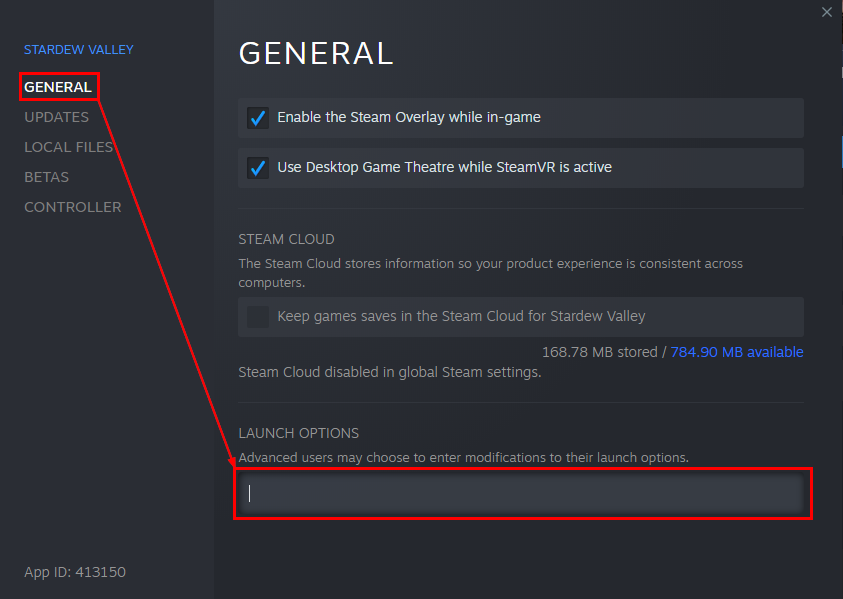
- Replace anything in the textbox with the text you copied from the installer.
To paste text, click in the box and press CTRL and V. - Click OK to save your changes.
- From now on, just launch the game through Steam to run SMAPI with the Steam overlay and achievements.
- Keep SMAPI's installer window open.


¹ To install manually instead, see instructions in the installer's readme.
Update
Just install the new version; the installer will automatically clean up previous versions. (You don't need to configure Steam again.)
Uninstall
- Run install.exe and choose uninstall.
- Blank the Steam launch options (if you changed them).
(If you want to play without mods temporarily, you can just launch Stardew Valley.exe directly instead.)