
Museum: Difference between revisions
imported>Butterbur Undo revision 89073 by Margotbean (talk) take another look: 3 left of the Prismatic Shard, 3 right, and one above = 7 |
imported>Margotbean |
||
| Line 142: | Line 142: | ||
==Notes== | ==Notes== | ||
*There is a total of 102 spaces available for donations to be placed but a total of only 95 available items to be donated. | *There is a total of 102 spaces available for donations to be placed but a total of only 95 available items to be donated. Six spaces in the center of the largest table cannot be reached to examine items placed on them, so it may be advisable to leave this area empty. | ||
*To move an item already placed on a museum table, you can click on it to pick it up, then place it where you want. You must already have entered the donations screen to do this, which means you must initially have had something new to donate. Once all items have been donated, no more moves are possible. | *To move an item already placed on a museum table, you can click on it to pick it up, then place it where you want. You must already have entered the donations screen to do this, which means you must initially have had something new to donate. Once all items have been donated, no more moves are possible. | ||
*In order to switch the position of an artifact on the Switch, you'll have to go into "Options" and disable "Use Controller Style Menus". However, the same rules of switching artifacts on a PC apply. | *In order to switch the position of an artifact on the Switch, you'll have to go into "Options" and disable "Use Controller Style Menus". However, the same rules of switching artifacts on a PC apply. | ||
Revision as of 20:19, 29 November 2019
| Stardew Valley Museum & Library | |
 | |
  | |
| Open Hours: | 8:00am to 6:00pm |
| Closed: | Town Festival days |
| Address: | East side of Pelican Town, south of the Blacksmith. |
| Occupants: | |

|keywords=Stardew Valley Wiki,Stardew Valley,Villagers,Museum,Stardew Valley Museum & Library,hours,location
}}{{#seo:
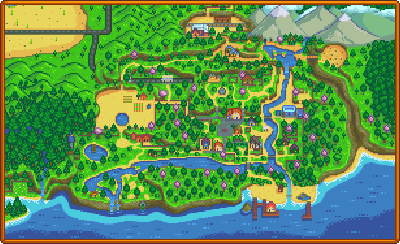
|keywords=Stardew Valley Wiki, Stardew Valley, Museum, gift |site_name=Stardew Valley Wiki |type=article |title=Museum - Stardew Valley Wiki }} The Museum can be found in the South-East corner of Pelican Town, south of the Blacksmith.
The museum contains a library and a gallery for displaying the museum's collection. At the start of the game, the entire collection is empty. Gunther, the curator, will ask The Player to help by donating Artifacts and Minerals, as well as finding the missing Lost Books from the library.
Only a single copy of any particular item may be donated. Donations may be rearranged until the collection is complete. Donated items may be examined by right-clicking on them.
Penny tutors Vincent and Jas in the library on Tuesday, Wednesday, and Friday.
Donation Rewards
Gunther offers rewards when the collection has grown to certain points, or for the donation of specific artifacts.
Total Donations
There are 95 items that can be donated to the Museum.
| Items Donated | Reward |
|---|---|
| 5 |  Cauliflower Seeds (9) Cauliflower Seeds (9)
|
| 10 |  Melon Seeds (9) Melon Seeds (9)
|
| 15 |  Starfruit Seeds (1) Starfruit Seeds (1)
|
| 20 |  'A Night On Eco-Hill' Painting 'A Night On Eco-Hill' Painting
|
| 30 |  Pumpkin Seeds (9) Pumpkin Seeds (9)
|
| 25 |  'Jade Hills' Painting 'Jade Hills' Painting
|
| 30 |  Lg. Futan Bear Lg. Futan Bear
|
| 40 |  Rarecrow #8 (+ Treasure Trove Achievement) Rarecrow #8 (+ Treasure Trove Achievement)
|
| 50 |  Bear Statue Bear Statue
|
| 60 |  Rusty Key (Gunther will deliver it to you the next day) Rusty Key (Gunther will deliver it to you the next day)
|
| 70 |  Triple Shot Espresso (3) Triple Shot Espresso (3)
|
| 80 |  Warp Totem: Farm (5) Warp Totem: Farm (5)
|
| 90 |  Magic Rock Candy Magic Rock Candy
|
| 95 (all items) |  Stardrop (+ A Complete Collection Achievement) Stardrop (+ A Complete Collection Achievement)
|
Minerals Donated
There are a total of 53 Minerals that can be donated.
| Minerals Donated | Reward |
|---|---|
| 11 |  Standing Geode Standing Geode
|
| 21 |  Singing Stone Singing Stone
|
| 31 |  Obsidian Vase Obsidian Vase
|
| 41 |  Crystal Chair Crystal Chair
|
| 50 |  Crystalarium Crystalarium
|
Artifacts Donated
There are a total of 42 Artifacts that can be donated.
To receive the 'Burnt Offering' reward, you must have already donated 10 artifacts that include the Rare Disc and Dwarf Gadget. The 11th (or later) donation that meets these conditions will earn you the 'Burnt Offering.'
| Artifacts Donated | Reward |
|---|---|
11 artifacts including: Rare Disc Rare Disc Dwarf Gadget Dwarf Gadget
|
 'Burnt Offering' 'Burnt Offering'
|
| 15 artifacts |  Skeleton Statue Skeleton Statue
|
| 20 artifacts |  Rarecrow #7 Rarecrow #7
|
3 artifacts including: Ancient Drum Ancient Drum
|
 Drum Block Drum Block
|
 Ancient Seed Ancient Seed
|
 Ancient Seeds (1) + Crafting Recipe Ancient Seeds (1) + Crafting Recipe
|
3 artifacts including: Bone Flute Bone Flute
|
 Flute Block Flute Block
|
5 artifacts including: Chicken Statue Chicken Statue
|
 Chicken Statue Chicken Statue
|
 Dwarf Scroll I Dwarf Scroll I Dwarf Scroll II Dwarf Scroll II Dwarf Scroll III Dwarf Scroll III Dwarf Scroll IV Dwarf Scroll IV
|
 Dwarvish Translation Guide Dwarvish Translation Guide
|
 Prehistoric Skull Prehistoric Skull Skeletal Hand Skeletal Hand Prehistoric Scapula Prehistoric Scapula
|
 Sloth Skeleton L Sloth Skeleton L
|
 Prehistoric Rib Prehistoric Rib Prehistoric Vertebra Prehistoric Vertebra
|
 Sloth Skeleton M Sloth Skeleton M
|
 Prehistoric Tibia Prehistoric Tibia Skeletal Tail Skeletal Tail
|
 Sloth Skeleton R Sloth Skeleton R
|
Books
- See: Lost Books
Achievements
There are 2 Achievements associated with donating Artifacts or Minerals to the Museum.
- Treasure Trove (Donate 40 different items to the museum)
- A Complete Collection (Complete the museum collection)
Notes
- There is a total of 102 spaces available for donations to be placed but a total of only 95 available items to be donated. Six spaces in the center of the largest table cannot be reached to examine items placed on them, so it may be advisable to leave this area empty.
- To move an item already placed on a museum table, you can click on it to pick it up, then place it where you want. You must already have entered the donations screen to do this, which means you must initially have had something new to donate. Once all items have been donated, no more moves are possible.
- In order to switch the position of an artifact on the Switch, you'll have to go into "Options" and disable "Use Controller Style Menus". However, the same rules of switching artifacts on a PC apply.
- Glitch: While donating, your inventory box automatically shifts down once an item is selected. If you attempt to move the screen around (say, to reveal free display spots further into the museum) before the inventory box has shifted down, you may be unable to place new items in the display spaces. To continue, simply quit the donation screen and try again.
-
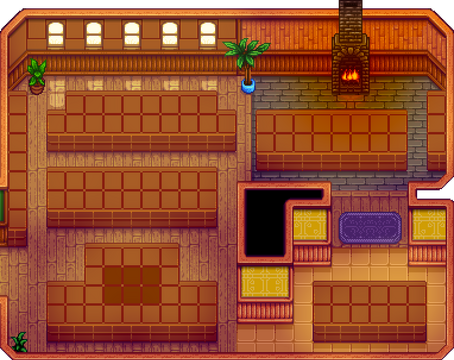 Museum Interior with unreachable tiles shaded
 -
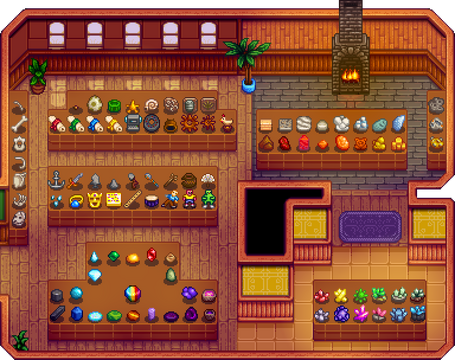 One example of an organized complete collection


History
- 1.4: Added donation rewards for 30, 70, 80, and 90 items donated.
| Buildings | ||
|---|---|---|
| Merchants | Abandoned House • Adventurer's Guild • Blacksmith • Bookseller • Carpenter's Shop • Casino • Desert Trader • Fish Shop • Giant Stump • Harvey's Clinic • Ice Cream Stand • Island Trader • JojaMart • Marnie's Ranch • Oasis • Pierre's General Store • Qi's Walnut Room • The Stardrop Saloon • Traveling Cart • Volcano Dwarf • Wizard's Tower | |
| Houses | 1 River Road • 2 River Road • 1 Willow Lane • 2 Willow Lane • 24 Mountain Road • Elliott's Cabin • Farmhouse • Island Farmhouse • Leah's Cottage • Mayor's Manor • Tent • Trailer • Treehouse | |
| Farm Buildings | Farming | Barn • Cabin • Coop • Fish Pond • Greenhouse • Mill • Pet Bowl • Shed • Silo • Slime Hutch • Stable • Well |
| Special | Desert Obelisk • Earth Obelisk • Farm Obelisk • Gold Clock • Island Obelisk • Junimo Hut • Water Obelisk | |
| Other Buildings | Community Center • Dog Pen • Island Field Office • Joja Warehouse • Movie Theater • Museum • Spa • Witch's Hut | |