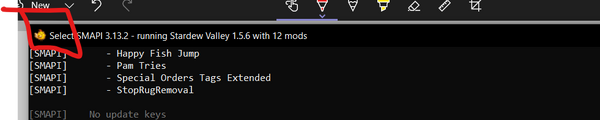
Make sure you have the latest version of that. The SMAPI version is shown at the top of the SMAPI console window.
Upload a log to the log parser, following the instructions on that page to find where your log is stored. It can help you diagnose common errors. Take a look at this annotated log for more information on how to read and understand your log.
If the parser website says the log is too big, or it takes too long to parse, you can open it up in any text editor (Notepad or Notepad++ work; on Mac TextEditor works), then copy from the very top of the log to the bottom of the first couple errors, and parse that.
The very top of your log will show a list of all your mods that need to be updated. You can also use Mod Update Menu to keep track of your updates from the in-game menu. The first thing to try when you're having issues with mods is to update everything shown there, even if some of the mods seem to be working fine right now.
If you've narrowed down the issue to a specific mod or group of mods, try performing a clean reinstall.
Remove all folders for the mod that's causing the issue, making sure to check the mod page for a list of every folder that's included. (If you're downloading mods from Nexus, you can look under "Preview File Contents." On ModDrop, you can find that information under "Files" on the sidebar.)
Redownload the mod and follow the installation instructions on the mod page. If you normally use a mod manager, reinstall the mod manually to make sure your issue wasn't caused by the mod manager placing files in the wrong locations.
If you still get the error, look through the common issues on this page or ask for help!
Reset your content files
Many problems are caused by broken game files (especially if you use XNB mods). You can reset your game files to fix that. SMAPI mods won't be affected.
If you use SMAPI on Linux or macOS, reinstall SMAPI to fix the launcher.
more options
If you don't want to reset all files, you have some other options.
Option 2: create retroactive backup to reset any file
If you installed XNB mods and want to reset one file you know is broken, you can just restore the original file. If you forgot to back it up, here's how to recover the original files without losing your modded ones:
Copy your game's Content folder to Content-modded.
Copy your (now reset) Content folder to Content-backup.
Move Content-modded back to Content.
Now your content files are still modded, but you have a backup of the original files.
Option 3: troubleshoot XNB mods
If you installed XNB mods, you're not sure which caused the problem, and you don't want to remove all your XNB mods, here's how to figure out which one is causing the problem.
Back up any XNB mods you want to keep.
Reset your game files (see instructions for Steam, for GOG Galaxy, or for Xbox). Any XNB mods will be removed, but SMAPI mods won't be affected.
If you use SMAPI on Linux or macOS, reinstall SMAPI to fix the launcher.
Launch the game to see if the problem is fixed.
Reinstall your XNB mods one at a time. After each install, test the game to make sure the mod doesn't cause problems.
Caution: XNB mods (which replace your game files directly) are no longer recommended and can cause issues. Resetting your content files will remove XNB mods you installed. After doing so, consider using content packs instead.
Run the game on your dedicated graphics card (Windows only)
The 'high performance' option described in the steps on the left.
Many computers have two options for running games: integrated graphics (part of the processor) and dedicated graphics (a separate graphics card by NVIDIA or AMD). Stardew Valley should be run on the dedicated graphics, but that's not always the default (especially on laptops). If you're not sure if this applies to your computer, it's safe to just try the instructions below anyway — they just won't do anything if it doesn't apply.
To fix this:
From the start menu, search for Graphics Settings and open it.
In the window that opens, click "Browse" near the top and choose StardewModdingAPI.exe in your game folder (or Stardew Valley.exe if you play without mods).
In the app list, click "Options" under StardewModdingAPI (or Stardew Valley if you play without mods).
Change the Graphics preference to "High performance".
Save.
Check whether your issues still happen.
FAQs about Stardew Valley 1.6
Are mods updated for 1.6?
Stardew Valley 1.6 is a major update, so many mods will need to be updated for it.
The latest SMAPI and Content Patcher add full support for Stardew Valley 1.6. Make sure you update SMAPI and all your mods to the latest versions.
44% of SMAPI mods were ready on day one, and that number should steadily rise as they get updated. You can check the mod compatibility list to see if your mods are updated, or look for purple update alerts in your SMAPI console window.
Most content packs should work fine once the SMAPI mod which loads them is updated.
XNB mods are mostly broken in 1.6. These have been deprecated for years and may cause issues like broken textures, missing or broken game content, and crashes. You can reset your game files to remove any you have.
Can I go back to Stardew Valley 1.5.6 until my mods update?
Yep. If you use Steam:
Click Stardew Valley in the Steam client.
Hit the cog button in the top-right corner and click the Properties option.
Go to the Betas tab.
Select "legacy_1.5.6" in the Beta Participation dropdown.
If you use GOG:
Launch GOG Galaxy.
Click Stardew Valley.
From the menu at the top, click Extras to see downloads for previous versions.
Game doesn't launch
When you try to launch the game, nothing seems to happen or the window closes instantly. (If you use Steam, it might show 'running' for a few seconds.)
Right-click the folder background. On Windows, also hold Shift
Click the option that says Open in Command Prompt, Open in PowerShell, Open in Windows Terminal or Open In Terminal (depending on your system settings/OS).
Make sure you have Stardew Valley 1.6.15 or later. (If you're not sure: launch without mods per step 4 below, click the "?" button on the title screen, and check the bottom-left corner of the screen.)
Find the section that shows graphics driver info. Make sure it says you have the latest version, and install any updates if not.
(Linux only) Don't force Wayland driver for SDL
You may have SDL_VIDEODRIVER=wayland set, which will force SDL applications like Stardew Valley to start under Wayland. Removing this override might help. It may be in your .bashrc, .bash_profile or similar location.
If you want/have to use Wayland (and it's not working out of the box), you can try to use your system's SDL2 library instead of the one bundled with Stardew Valley. This is of course unsupported. Navigate into the game's game subfolder and rename libSDL2-2.0.0.dylib and libSDL2-2.0.so.0, for example to libSDL2-2.0.0.dylib.disabled and libSDL2-2.0.so.0.disabled. If this works, perhaps make a note of it (for example in a textfile inside your Stardew Valley folder) to avoid forgetting this change in case you at some point run into issues and need to undo it.
Use the compatibility branch or an older version of Stardew Valley
Steam can't find the game launcher, usually because your Steam launch options are incorrect. Common fixes:
If you want to use SMAPI: make sure it's installed and your launch options are correct (see install guide).
If you're uninstalling SMAPI:
In Steam, right-click Stardew Valley and choose Properties.
Click the Set Launch Options button.
Make sure the textbox is completely empty.
"Could not load file or assembly"
If the 'file or assembly' starts with Microsoft or System (like "FileNotFoundException: Could not load file or assembly 'System.[...]' or one of its dependencies") OR you get something like "The library '[...].dll' required to execute the application is not found in 'C:\Program Files\dotnet`" (often this is hostpolicy.dll), something is wrong with the core frameworks used by the game.
(Stardew now comes packaged with the dependencies needed to run, so you shouldn't need to install them yourself.)
You may also see an error like this if you installed SMAPI manually (by renaming the .bat to a .zip and moving files yourself). Try reinstalling SMAPI using the installer if that is the case.
OutOfMemoryException errors
Your log shows OutOfMemoryException errors in the console, and the game may severely lag or crash. That means your game ran out of available memory mid-session.
This might also show up as Unable to allocate pixels for the bitmap.
Some common fixes:
Make sure you have the latest Stardew Valley 1.6.15, which is 64-bit and doesn't have the 32-bit limitations of older versions.
If you still get the error, you might need to remove content mods you don't need (particularly content packs for Custom Music, SAAT or TMXL Map Toolkit, which can use a lot of memory).
NoAudioHardwareException: Audio has failed to initialize
This exception means that for whatever reason, either the game or SMAPI cannot use your computer's audio. A possible fix (for Windows) is installing OpenAl. You can also try plugging in some headphones or connecting a bluetooth headset.
Mac: Contents/MacOS/StardewValley Already Exists
This error looks something like:
"An error occurred in the base update loop: IOException: The file '/Users/USERNAME/Library/Application Support/Steam/steamapps/common/Stardew Valley/Contents/MacOS/StardewValley' already exists."
If this happens, verify the following:
Show hidden files in Finder with Command+Shift+., then go to your home directory (named after your username, likely has a little home icon next to it on the left side of Finder). There should be a bunch of hidden folders that show up.
The folder ~/.config/StardewValley/ErrorLogs exists. If it doesn't exist, make it exist.
Your screenshots button works. If it doesn't work, make sure the folder ~/.local/share/StardewValley/Screenshots exists. If it doesn't exist, make it exist.
If neither of those fixes works, it's not clear what to do.
Specific errors when loading a mod
"Skipped '...' because it doesn't have a manifest.json"
SMAPI couldn't find the manifest.json file for the mod in that folder.
Common causes:
It's not a SMAPI mod, so it won't work in the Mods folder. See the mod's page or documentation for install instructions.
The mod isn't installed correctly. Try deleting and reinstalling the mod to fix that. If you're using a mod manager like Vortex, try reinstalling the mod yourself instead.
"Skipped '...' because it was blocked by Windows Smart App Control"
When you see this error:
SMAPI version
error shown
≤ 4.5.2
"Skipped … because its DLL couldn't be loaded."
When SMAPI developer mode is enabled via Generic Mod Config Menu, the technical details show: FileLoadException: Could not load file or assembly '…'. An Application Control policy has blocked this file. (0x800711C7)
≥ 4.5.3
"Skipped … because it was blocked by Windows Smart App Control"
The mod was blocked by the optional "Smart App Control" feature in Windows 11, which tries to guess whether an app is safe. It tends to be inaccurate and often changes its mind from one moment to the next. Unfortunately, you can't bypass it for a known valid app.
Smart App Control is only enabled if you accepted to send "optional diagnostic data" to Microsoft during Windows installation. You can safely disable (and re-enable) it anytime.
If you want to disable Smart App Control:
Open the Settings app.
Go to Privacy & Security > Windows Security > App & Browser Control > Smart App Control settings.
Set it to off.
If you didn't realize you're sending information about your computer usage to Microsoft, you can optionally disable that too:
Open the Settings app.
Go to Privacy & Security > Diagnostics & Feedback.
Make sure the SMAPI window doesn't show 'Select' in the title bar:The 'select mode' indicator.This pauses loading so you can see what the console says, enabled when you select any text on the console window. To fix it, just click the console and press the 'enter' key a few times.
An antivirus is slowing SMAPI. Often this results in long delays while loading (e.g. several seconds to do a very basic task). You can try disabling your antivirus to check if this is the cause; if that fixes it, re-enable the antivirus and then whitelist SMAPI, Stardew Valley, and the game folder in your antivirus settings. (Tip: Windows has a default antivirus named Windows Defender, even if you didn't install one yourself.)
If you have many mods, a loading time measured in minutes is not unusual. The exact loading time depends heavily on which mods you have and what your computer is like. If you have a few very large mods (e.g. expansion-type mods), you should probably wait a few minutes before deciding something is wrong. If you have PyTK installed but are no longer using it, try removing it to see if this helps the load times.
SMAPI or mod files disappear, or they're blocked by your antivirus or browser
Your antivirus or browser might delete, block, or report SMAPI or mod files. This is almost always a false positive, meaning the files don't contain a trojan.
How can I know if it's actually safe?
Nothing on the Internet is guaranteed, but it's most likely safe — you can check by reading the code (e.g. see SMAPI's code), decompiling the download, or uploading it to VirusTotal. VirusTotal scans the file with sixty or so antiviruses; if only one or two detect an issue, it's most likely a false positive. Note that all files on Nexus Mods are scanned by VirusTotal automatically before they're available to download.
Why does this happen?
Antiviruses and browsers are usually concerned because...
The download is still new. In this case it didn't really detect anything, it's just worried because it's an unknown file. Antiviruses often show a fake trojan name like Trojan:Win32/Emali.A!cl for this. Antiviruses learn to allow it after enough users download it, but that resets for each release.
Antiviruses may check for certain patterns like accessing files or rewriting code, which are both things SMAPI mods do as part of their normal functionality (since changing the game is the whole point).
How can I download a file which my browser blocks as 'suspicious'?
There are two approaches:
You can wait a few days before downloading a new update (or a few weeks for a less popular mod). Once enough users have downloaded it, your browser won't considers it an unknown file anymore.
Or the browser UI which says the file is supicious should have a 'more info' link, or a symbol like ⋮ or ▼ which indicates options. Click that to show the option to download it anyway.
How can I install SMAPI or a mod if my antivirus flags it?
There are two approaches:
You can wait few days before downloading a new update (or a few weeks for a less popular mod). By then enough users should have downloaded it to reduce antivirus alerts.
Or if you've checked that it's safe above, another option is to...
Add an exception to your antivirus for the Stardew Valley folder (search online for your antivirus name with the words add folder exception for instructions).
After updating to the latest versions, launching the game still shows an old SMAPI or game version
That usually means you have two copies of the game: one copy you updated, and another you're actually playing.
To check if that's the issue:
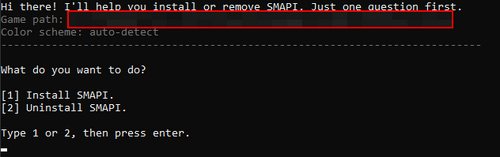
Launch the SMAPI installer again, and note the "Game path" shown on the first screen:
Launch the game with SMAPI, and note the "Mods go here" path shown at the top of the output:
Open the game folder through Steam, GOG Galaxy, or Xbox. To do that: go to Find your game folder, click 'more options' under the table, and see options 3–5.
All three paths should be identical (except for the /Mods part).
If you have multiple game folders, the best solution is to only have one. To do that:
Make a copy of your Mods folder somewhere else.
Uninstall the game.
Delete any folders you found above.
Reinstall the game through Steam or GOG Galaxy.
Reinstall SMAPI, which should now detect your single game path.
Copy your mods back into the new game folder.
more options
If having multiple copies of the game is deliberate and you're just having trouble installing SMAPI, you can copy the SMAPI installer into a subfolder of the game folder you want to update. When you run it, it'll detect the parent folder automatically and update that one.
Game screen is frozen when launched via SteamLink or other Steam RemotePlay
solution - from PC
Launch SDV via SMAPI's StardewModdingAPI
The cmd will open and show logging information about loading... and then it will launch SDV
Once SDV is launched you need to [alt]+[tab] out of it. It should go to cmd once you do, but if it doesn't immediately select cmd, simple select that window
Click the minimize button [-] on cmd to minimize it
With cmd now minimized, you can refocus SDV by clicking the window and it should now be unfrozen!
solution - from controller connected to SteamLink
Launch SDV via SMAPI's StardewModdingAPI
The cmd will open and show logging information about loading... and then it will launch SDV
Once SDV is launched, the screen will appear frozen. Hold down the left "options-like" button on your controller to open the SteamLink quick menu.
On an Xbox controller, this is the "Back" button
On a PlayStation controller, this is the "Share" button
On a Steam controller, this is the "Left Arrow" button
In this menu, select the "Virtual Keyboard" option to reveal an onscreen keyboard
Select the `[alt]` key and then the `[tab]` key. This will Alt-Tab you out of the frozen SDV screen and auto-focus the cmd window.
With the cmd now revealed and focused, on the still visible "Virtual Keyboard" select the "Windows" key and then the "down arrow" key. This should minimize the cmd window
The "Windows" key is in the bottom-left side of the keyboard and looks like it has 4 arrows/triangle icons on it.
When cmd minimizes SDV should automatically be refocused and should now be unfrozen!
Other issues playing the game
Game lags or stutters in-game
There's a few things you can try.
If you use mods:
Update SMAPI and your mods to their latest versions.
Make sure there's no repeating errors in the SMAPI console window (if there are, see get help).
Temporarily remove all mods except SMAPI and Error Handler. If that fixes it, one of your mods might be causing lag. (You can still try the other fixes below to see if they help.)
If using NVIDIA GeForce Experience, make sure WhisperMode is disabled.
For Linux/SteamDeck players:
From your game folder, open smapi-internal/config.json and set ListenForConsoleInput to false. (Note the instructions at the top of that file about creating a config.user.json file.)
From #(Linux only) Don't force Wayland driver for SDL, you can patch the bundled SDL binaries to use the system binaries for SDL, and this could fix your performance entirely, especially if running in fullscreen lags a lot compared to running in 1/4 screen, which is an old issue from old versions of SDL2.
Add an exception in your antivirus software for the Stardew Valley folder. You can search online for your antivirus name with the words add folder exception for instructions. Note for Windows players: if didn't install an antivirus, you have Windows Defender by default and it can cause lag. Try excluding the game folder in that case.
Set the processor affinity for StardewModdingAPI.exe (if using mods) or Stardew Valley.exe (without mods) to 2 or higher.
Set the process priority for StardewModdingAPI.exe (if using mods) or Stardew Valley.exe (without mods) to High.
If you own the Steam version of the game, try launching the game through the Steam client.
If you're still having issues after that, see get help.
Game audio doesn't play or audio is distorted (Windows only)
Audio plays fine in your browser or other apps, but the game is silent. Here are some common fixes:
The issue is down to a faulty execstack call (See Steam discussion) in the call-stack within these bundled libraries that are causing the multiplayer library to crash and thus the menu to never load.
To fix this:
Obtain a version of patchelf for your distribution, or from upstream (the NixOS/patchelf GitHub repository).
Then, open a terminal, and navigate to your Stardew Valley root folder.
Run patchelf --clear-execstack libGalaxy64.so.
Then run patchelf --clear-execstack libGalaxyCSharpGlue.so.
The issue should be fixed now.
Can't connect to another player in multiplayer
Check your game setup:
Make sure you have the latest Stardew Valley version (1.6.15 on PC).
Make sure the host (main player) is in co-op mode. They need to click the Co-op button on the title screen, and launch the save by clicking "Host (farmname) Farm". Loading a save through the regular load game menu, even if cabins have been built, will launch it in single-player mode.
Make sure you have enough cabins built for the number of players.
Make sure the server is set to online in the game options.
Turn off firewalls and antiviruses for all players. If you have more than one antivirus, that's very likely the cause. Never use more than one antivirus at a time.
If you use mods and are getting a "version mismatch" error, check your log files for a line like [19:49:26 TRACE game] Starting server. Protocol version: 1.6.15 and check whether the protocol version matches.
For console players, please try all of the steps that apply (particularly the first four under 'check your game setup') and try power cycling your console. Please note that all consoles require their paid online service to play over the internet.
Windows: reWASD (not free after trial period) or InputMapper (free but more complicated) to remap your controller as an Xbox controller.
last resort on Linux/Mac
As a last resort on Linux or Mac, you can disable the SMAPI console window to fix this. You won't see update/error alerts unless you check the log, and your game won't launch after a crash until you delete the smapi-internal/StardewModdingAPI.crash.marker file. You should periodically check the log to make sure everything is working correctly. If you really want to do this:
Open the StardewValley file (the one with no file extension) in a text editor.
Change SKIP_TERMINAL=false near the top to SKIP_TERMINAL=true.
On Windows: disabling the console window isn't possible.
You'll need to repeat this after updating SMAPI.
Cursor gets stuck on museum or build screen
When placing items in the museum or placing buildings on the farm, the cursor gets stuck in one spot and snaps back whenever you try to move it.
That happens when the game doesn't detect the gamepad mode correctly. To fix it:
Load your save.
Open the in-game menu and go to the options.
Set the Gamepad Mode option to either Force On (if you use a controller) or Force Off (if you use a keyboard and mouse).
Pet event repeating over and over
You probably have a pet named the same thing as an NPC in the game, most likely a modded NPC (both reported instances have been Stardew Valley Expanded NPC names). Save editing to remove your pet may help, but is tricky and difficult. Narrowing down the cause of this issue has been somewhat difficult. You can try naming the pet something other than the name of an NPC, or rejecting the pet, and see if that helps, but you may end up with multiple pets.
Other issues with the SMAPI installer
SMAPI installer opens, then immediately closes
Q: The installer opens for a second, then immediately closes.
A: Make sure you’re installing SMAPI 3.13.1 or later, which fixed an issue with path names. If you are, try whitelisting the SMAPI installer with your antivirus, and redownload, as your SMAPI installer may have been mangled by your antivirus. If that still doesn’t work try these steps:
Open the installer folder.
Hold shift and right-click on the folder background.
Click the option that says Open in command prompt / PowerShell / Windows Terminal (depending on your Windows settings).
Run "install on Windows.bat" (if Command Prompt) or ./"install on Windows.bat" (if PowerShell or Windows Terminal).
Now if it crashes, the window should stay open so you can see the error.
Post a screenshot of the full window when it shows the error in the #using-mods discord channel for debugging help.
Unfortunately SMAPI only supports the main branch of the game currently. There are formidable difficulties across all mods in supporting all three variations, 32-bit imposes significant restrictions on what mods can do, and the Steam hardware stats show that ≈99.69% of players have 64-bit.
Having multiple versions of SMAPI (like we do for Linux/macOS/Windows compatibility) wouldn't be enough in this case. Every C# mod author would need to manually port two versions of every update of every mod forever, which is prohibitively unfeasible. It's possible that in the future we'll either figure out how SMAPI can automatically rewrite mods for the compatibility branch, or some modders may port SMAPI and individual mods to the compatibility branch.
How can I play if I can't update to the latest versions?
You have a few options.
First, make sure you really can't update. Over 99% of systems should be compatible with the main branch; it's only very old system that are 32-bit-only or use unsupported graphics cards that might not work.
Or you can switch to the game's compatibility branch without mods. Mods don't work with it currently, but it'll continue receiving the same content updates backported to the older frameworks for players with older systems.
Or you can rollback to the previous Stardew Valley 1.5.4, so you can continue playing like before. The newest mod updates won't work for you, but you'll be able to install any mod updates up to 29 November 2021. If (or when) we figure out how to make mods work with the compatibility branch in the future, then you'd be able to switch to the compatibility branch instead.
If you want to rollback to Stardew Valley 1.5.4, here's how:
Please note this only works on the Steam version of the game!


 StardewModdingAPI.exe
 Stardew Valley.exe